FiveM Anti-DDoS: DDoS Protection for Your GTA RP Server
Updated
A FiveM anti-DDoS — DDoS protection built for FiveM — is a service that puts a filtering proxy between your players and your server: it absorbs the UDP flood (L4) on port 30120, rejects fake cfx.re connections (L7) and hides the machine’s real IP. A service that does only one of the three leaves you to go down from the other two.
You do not have to change host for that. The server stays exactly where it is, with the provider you already have; the only change is a configuration block pasted into server.cfg. No migration, no DNS change, no resource to install.
A FiveM server that starts to matter — a GTA RP filling its slots, a community that grows — does not stay quiet for long. The attack rarely comes from a competent adversary: it is a UDP flood rented from a booter for a few euros, pointed at port 30120, bought by a banned player or a rival server. It needs no vulnerability, no access, and no particular skill.
And yet most servers that consider themselves protected are covered against roughly a third of the problem. FiveM anti-DDoS is not one feature — it is three separate jobs, each of which fails differently. This page explains which, why the usual answers only cover one, and what fiveshield actually does.
- Absorbs UDP floods before they reach your link
- Blocks fake cfx.re connections before FXServer
- Hides your real IP
Keep your current host: one block in server.cfg. From $2.25 CAD/day for up to 50 players, no subscription.
$10 CAD free on your first server · No card needed · Cancel anytime
What an attack looks like from the owner’s side
There is no warning. The server is running, the population is normal, and then everyone times out at once. The panel shows nothing wrong: CPU is low, RAM is low, the FXServer process is still alive. That is exactly what makes it hard to diagnose — from the machine’s point of view nothing is happening, because the problem is upstream of it.
What is saturated is the network link. Attack packets fill the available bandwidth before reaching your server, and your players’ legitimate packets are lost in the same bottleneck. Restarting FXServer changes nothing. Restarting the machine changes nothing. The attack stops when the attacker decides it stops, or when your host null-routes your IP — which from your players’ point of view is the same outcome, just more durable.
Booter, stresser, "getting DDoSed": the same product
The word you will see in GTA RP Discords is booter — sometimes stresser, or IP stresser. Three names for the same thing: a DDoS-on-demand service, sold by subscription, with a web interface, a field for the address, a field for the duration, and a button. Nothing to install, nothing to understand.
That is what explains the attacker profile on FiveM: these are almost never people who know what a UDP packet is. "Getting DDoSed" on a GTA RP server, in the overwhelming majority of cases, means being targeted by someone who paid a few euros and pasted an address into a form. The practical conclusion is reassuring and alarming at once: the attack is dumb, but it is within reach of any banned player.
Why the game port has nothing to verify
FiveM carries game traffic over ENet, on top of UDP. UDP establishes no connection: there is no handshake to complete before your server starts processing a packet. The attacker therefore has nothing to prove, nothing to complete, and does not even need to receive a reply — the source address can be spoofed end to end.
That is the structural difference from a website. An HTTP request arrives at the end of a TCP handshake, which gives you a point at which someone can be refused before you do work for them. On port 30120, that point does not exist.
Amplification does the rest
An attacker with 100 Mbps does not send you 100 Mbps. They send small requests, with your IP spoofed as the source, to misconfigured services that answer much larger than they were asked: open DNS resolvers, NTP servers, Memcached, SSDP. Every reply lands on you.
Amplification factors run from 30× to over 50,000× depending on the protocol. That is why a multi-gigabit flood costs about as much as a streaming subscription, and why "having a good machine" protects nothing: the machine was never the limiting factor, the link is.
The three attacks a FiveM server actually gets
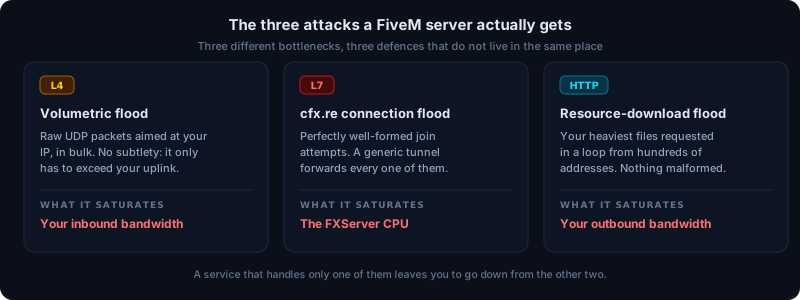
"DDoS" is one word for three things that are not defended in the same place. A service that handles only one of them leaves you exposed on the other two, and that is the common case.
1. The volumetric flood (Layer 4)
The base case: a very large volume of UDP packets aimed at your IP, making no attempt to resemble anything. It is crude and it works, because all it has to do is exceed your uplink capacity. A server on a 1 Gbps line goes down under 1 Gbps of attack, no matter how well configured it is.
This is handled upstream, on a network with the capacity to swallow it — never on the attacked machine, which by definition cannot receive less than what its link accepts.
2. The cfx.re connection flood (Layer 7)
The interesting one, and the one almost nobody filters. Once raw volume is absorbed, a serious attacker stops sending junk and starts sending technically valid traffic: thousands of well-formed FiveM connection attempts per second.
To a generic L4 tunnel, each of those looks like a player. So it gets forwarded, and your FXServer does the work of refusing it: parsing the handshake, checking the cfx.re ticket, queueing, allocating, then rejecting. The link is no longer saturated — the server’s CPU is, and your real players can no longer get in. The symptom is different ("the server is up but nobody can join"), the cause is the same.
3. The resource-download flood
Every player who joins downloads your resources. On a well-stocked RP server that routinely runs from several hundred megabytes into the gigabytes. An attacker only has to request your heaviest files in a loop, from a few hundred addresses, to saturate your outbound bandwidth with perfectly legitimate requests.
There is nothing malformed to detect here: it is exactly what a real player does, only more often. This is not fixed with a filter but with a cache that serves those files from somewhere other than your machine.
These are not the only targets on your machine: the next section covers the two people usually find out about too late — the query API on port 30120 and the txAdmin panel.
What server.cfg can and cannot do
The same server.cfg variables come up in every FiveM discussion about DDoS. They are useful, they are free, and you should set them. None of them is mitigation: they reduce what your server publishes and what it accepts, they change nothing about what arrives on your link.
sv_endpointPrivacy — removed, and it never protected your server
The reference still describes it as hiding player IP addresses from the public reports the server outputs — player addresses, not yours. On current FXServer builds it no longer does even that: the convar was removed, the behaviour became unconditional, and leaving it in the config makes the server print a startup message asking you to take it out.
It does not hide your machine’s IP and it does not drop a single packet. This is the most common confusion on the subject: the name suggests origin masking, the behaviour has nothing to do with it.
sv_requestParanoia — an HTTP filter, not an anti-DDoS
sv_requestParanoia runs from 0 to 3 and only concerns HTTP requests reaching the server. At level 1 it blocks addresses whose requests carry a Via header; at level 2, those carrying Upgrade-Insecure-Requests; at level 3 it also closes the socket the requests came in on. It is designed against proxy-relayed HTTP floods.
Two limits worth knowing. It reasons about headers, so an attacker who does not send them is unaffected. And it does not see UDP: neither game traffic nor the getinfo queries on port 30120 go through that path. Set it to 3, and do not count on it against a volumetric flood.
sv_forceIndirectListing and sv_proxyIPRanges — the real pair for the origin
sv_forceIndirectListing true stops the server being advertised with its real IP address: this is the setting that matters as soon as you sit behind a proxy. It works together with sv_endpoints, which declares the actual endpoint or the proxies, and where needed with sv_listingHostOverride / sv_listingIpOverride, which override the hostname and IP sent to the master server.
sv_proxyIPRanges declares the networks, in CIDR notation, from which the X-Real-IP header is accepted and the rate limiter bypassed — in other words, your proxies. By default it lists only private ranges (10.0.0.0/8, 127.0.0.0/8, 192.168.0.0/16, 172.16.0.0/12); not adjusting it makes FXServer see the proxy address instead of the player’s, which breaks your IP bans before it breaks anything else.
Together these keep your IP from being published. They do not erase it from an old DNS record, from a website hosted on the same machine, or from a resource calling a hardcoded address.
sv_authMinTrust and sv_maxClients — against fake players, not against packets
sv_authMinTrust runs from 1 to 5 and expresses how hard a client identity is to spoof: raising the level turns away the least trustworthy identities. sv_maxClients caps the number of players (1 to 2048), and therefore the size of the queue.
Both are decided inside FXServer, once the attempt has been received and processed. That is useful against bots that actually join; it does nothing against ten thousand attempts per second, because the cost you wanted to avoid — receiving, decoding, verifying — has already been paid by the time the decision is made.
Set the ones that still exist: it is time well spent, and a badly configured server gets found faster. But none of these variables can refuse a packet before it has crossed your link, for a reason that has nothing to do with their quality: none of them runs anywhere other than on the attacked machine.
Why the usual answers fall short
"We’re behind Cloudflare"
Cloudflare protects HTTP. FiveM game traffic is not HTTP — it is UDP on port 30120, which the standard Cloudflare proxy never sees. Putting your domain behind Cloudflare protects the community website and does precisely nothing for the game server.
Worse, it creates false confidence, and it almost always leaves the real IP exposed somewhere: a forgotten subdomain, a DNS record still in the clear, an old A record. The attacker only needs one.
There is one exception better known than argued at you: Cloudflare Spectrum is a Layer 4 proxy that does relay TCP and UDP and does mask the origin. Two caveats. Cloudflare’s documentation states that custom TCP/UDP applications — which port 30120 is — require an Enterprise plan with Spectrum as a paid add-on, which is not the order of magnitude of a community server. And Spectrum remains a generic tunnel: it does not verify the cfx.re handshake, so it forwards a well-formed fake connection exactly as any other L4 tunnel would. It covers the first of the three jobs, not the second.
The host’s included anti-DDoS
It exists, it is real, and it is generic. It is tuned to protect an entire network against large attacks, not to understand one game’s protocol. In practice it does stop the volumetric flood, and it sees no difference whatsoever between a player joining and ten thousand fake connections per second. The exception is a host that adds a game-aware layer on top, such as OVHcloud’s Game firewall, which lists a FiveM profile on its recent Game servers (2024 and later); OVHcloud’s documentation does not say what that profile checks.
It also has an unpleasant failure mode: when mitigation kicks in, it often filters coarsely enough to degrade the game for players who are already connected. Staying online at 400 ms with rubber-banding is not very different from being offline, as far as players are concerned.
iptables, nftables and installable "anti-DDoS" scripts
Filtering on the attacked machine is too late by construction: the packets have already crossed the saturated link to reach the rule that drops them. You save application CPU; you do not recover bandwidth.
As for Lua resources sold as "anti-DDoS" on marketplaces: they run inside FXServer, so after the packet has been received, decoded and processed. They can rate-limit application abuse. They cannot, by definition, stop a network attack.
Changing IP
This works for about a day. Your players need the address to connect, so the attacker learns it the same way they do — the server list, a friend, a throwaway account. Without permanent origin masking, changing IP is a delay, not a fix.
| Approach | What it stops | What it cannot stop | Where the packet is handled |
|---|---|---|---|
| Cloudflare web proxy (HTTP mode) | HTTP traffic for the community website | The game: UDP on port 30120 does not go through that proxy | On Cloudflare’s network, HTTP side only |
| Host-included anti-DDoS (generic network layer) | The volumetric flood, at network level | Fake cfx.re connections, which it cannot tell apart from a player | Upstream of the server, with no knowledge of the protocol |
| iptables / nftables on the machine | Application abuse, once the packet has been received | Link saturation: the packet has already crossed it | On the attacked machine, after the link |
| A Lua "anti-DDoS" resource | Event and script abuse on the game side | Nothing at network level: it runs inside FXServer, so after the packet has been received, decoded and processed | Inside FXServer, at the very end of the chain |
| A self-built XDP proxy | Volume, if you have the network capacity to absorb it | Whatever you have not implemented: cfx.re handshake, cache, failover | In the kernel of your own machines |
| fiveshield | Volume in XDP, fake cfx.re connections at L7, the download flood via the cache | An origin IP you expose elsewhere: DNS, a website on the same machine, a hardcoded address | In the kernel of our instances, ahead of your link |
What FiveM DDoS protection actually has to do
Three jobs, and a fourth nobody talks about because it is not measured in gigabits.
Absorb volume upstream, in the kernel
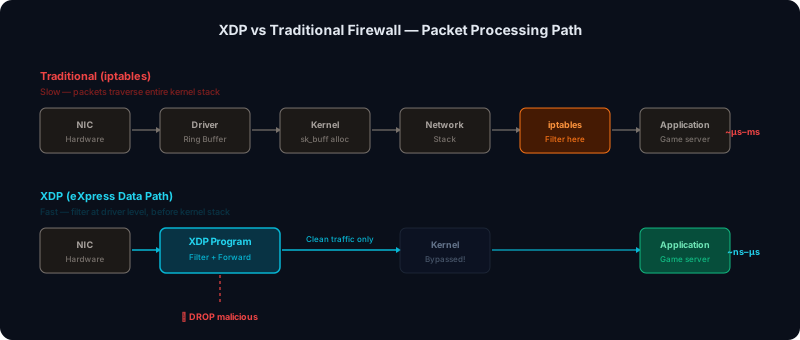
Volumetric traffic is handled where the capacity exists, ahead of your link. What matters is not only the Tbps figure but where the packet is dropped. Filtering in userspace means an attack packet costs a kernel wake-up, a memory copy and a context switch — which makes the mitigation itself a target.
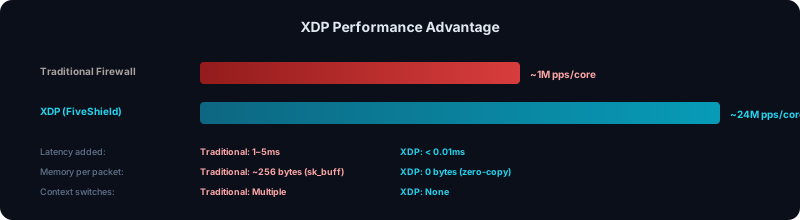
fiveshield filters in XDP, that is, inside the Linux kernel’s network driver, before the sk_buff is even allocated. A packet dropped there costs almost nothing to drop, which is the only reason mitigation throughput holds under real load.
Understand the game protocol, not just the packets
This is the part a generic proxy cannot offer, because offering it means implementing the FiveM protocol. Telling a real player apart from a fake connection means verifying the cfx.re handshake itself — the ticket, the sequence, the consistency between what is announced and what follows.
That Layer 7 filter is the difference between "the server is online" and "players can actually join" during an attack.
Hide the origin, permanently
Filtering is defensive; origin masking is what ends the cycle. If your players only ever resolve a proxy address and never learn your machine’s real IP, the attacker has nothing left to aim at except infrastructure built to be aimed at.
It is also the piece owners most often undo without noticing: an unproxied website on the same machine, an old DNS record, a resource calling a hardcoded address. Any one of the three makes the rest pointless. The first thing to look at is what the cfx.re listing already publishes about your server — that is what an attacker reads first.
Not break voice on the way through
Every proxy adds a hop, and the hop is where voice chat degrades. Mumble and PMA-Voice are unforgiving about jitter in a way game traffic is not: a mitigation path tuned only for throughput produces a server that stays online and sounds broken.
That is a selection criterion, not a detail. A protected server where voice stutters is a server players leave without ever saying why.
How fiveshield does it
fiveshield is a reverse proxy purpose-built for FiveM and RedM. Your players’ traffic goes through our network, is filtered there, then reaches your server — whose address is never exposed.
The 11 proxy locations
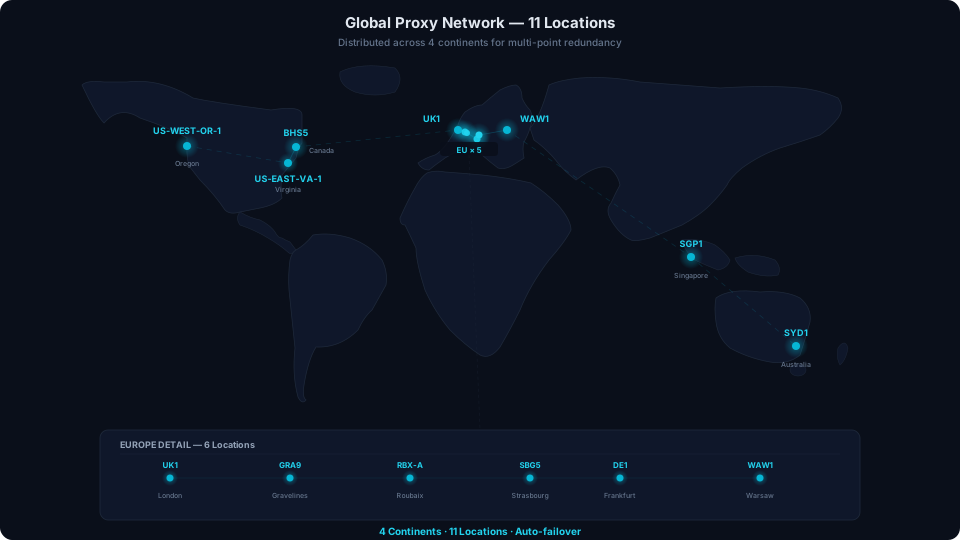
Six in Europe, three in North America, one in Asia and one in Oceania. You pick one in the dashboard when you add your server — ideally the one nearest the machine.
North America: Beauharnois (BHS5), Virginia (US-EAST-VA-1), Oregon (US-WEST-OR-1).
Europe: Frankfurt (DE1), Gravelines (GRA9), Roubaix (RBX-A), Strasbourg (SBG5), London (UK1), Warsaw (WAW1).
Asia: Singapore (SGP1). Oceania: Sydney (SYD1).
Distributed L4 scrubbing
Our proxies run on OVHcloud, whose 17 Tbps anti-DDoS network absorbs the raw volume upstream of them. On the 11 proxy locations themselves, filtering happens in XDP, in the kernel, with per-port counters and limiters: one client under attack does not consume another’s capacity.
On every proxy instance the XDP program is attached to the network interface and runs on each packet as soon as the driver receives it. Per-source rate limits and SYN-flood protection apply at that point, and only traffic from the players assigned to that instance, on your server’s active ports, is passed on to the nftables rules behind it, which handle connection tracking. Everything else is dropped before the kernel has committed anything to it, and that is where the per-core gap in the figure below comes from.
Layer 7 filter on the cfx.re protocol
Every connection is verified against the FiveM protocol before being forwarded to your server. An attempt that does not correctly complete the handshake never reaches FXServer — which is exactly what a generic tunnel lacks.
Dynamic per-player assignment
Players are not all routed through the same address. Each connection is assigned a proxy instance, which means a compromised or attacked address neither exposes nor blocks your whole population — it affects the players who were on it, and they get reassigned.
CDN cache for resources
Your resource files are served from cache, not from your machine. That removes the third attack vector (the download flood) and, incidentally, cuts your players’ initial load time substantially — the same mechanism fixes both.
txAdmin and panel protected
The admin interface goes through the same protection as the game. You keep control during an attack, which is precisely when you need it.
Works with the host you already have
fiveshield does not replace your hosting, it sits in front of it. The server stays on the machine and with the provider you have today, your panel stays yours, and your hosting contract is unaffected. The only change on the server side is a configuration block in server.cfg.
So there is nothing to migrate, no DNS record to move and no resource to install. That is what makes setup possible during an attack, where a migration is not.
Measured latency: under 0.5 ms added within the same location, and typically under 20 ms to the proxy for players outside the region — voice stays usable, which is the point.
Put all of this in front of your server: one block in server.cfg, about five minutes.
FiveM server under attack right now: what to do
If you are reading this during the attack, three things, in this order.
1. Do not restart, and do not publish a new address
Restarting FXServer or the machine achieves nothing: the attack is upstream, and all you lose is the current session. Announcing a new address in your Discord is worse — the attacker is in there, and that is often where they got the first one.
2. Confirm it really is an attack
Low CPU and RAM, a live FXServer process, and every player dropping at once: that is the network, not the server. Ordinary lag makes something go up — CPU, tick time, memory; a network attack makes nothing go up at all.
Two useful variants. A server that vanishes from the list while it is still running, or players stuck on "Failed to get info from server (tried 3 times)", points at a query flood rather than a volumetric one. A txAdmin you cannot reach while the game still answers points at port 40120.
3. Stop exposing the origin IP
That is the only action that changes anything durably, and the order matters. Putting a proxy in front of a server whose address is already known does not empty your link: the attacker keeps hitting where they were hitting. The sequence that works is: put the proxy in place, ask your host for a new IP, publish it nowhere, and let only the proxy address out.
Setup fits in five minutes — one block pasted into server.cfg and a restart — because there is no DNS change and no migration to wait on. That is precisely why it is doable during the attack.
- Under attack right now? The emergency page, step by step
- Not sure it is an attack? Start with the symptom guides
Setting the proxy up cold, before anything happens, is better still: a calm setup gives you time to check nothing is leaking elsewhere — a website on the same machine, an old DNS record, a resource calling a hardcoded address. That is what decides whether the masking holds.
Getting set up
One configuration block pasted into server.cfg, and that is it. No DNS change, no resource to download, no migration: your server stays with your current host, whoever that is.
You create an account with Discord, add your server, copy the block the dashboard gives you, and restart. Budget five minutes. Your first server comes with $10 CAD of free trial credit (eligible accounts, no credit card), about four days of protection for up to 50 players, so the first run costs nothing.
The CDN, txAdmin protection and the dashboard are included, not sold separately. Billing follows the population that actually connected: no tier to pick in advance, and nothing to cancel if you stop.
$2.25 CAD/day covers up to 50 players (the first tier, $0.045 each), then $0.030–$0.047 per extra player per day · no subscription · $10 CAD free trial credit on your first server, no card required
Frequently asked questions
What does anti-DDoS mean for a FiveM server?
DDoS stands for distributed denial of service: traffic from many sources is aimed at your server until real players can no longer connect or stay connected. An anti-DDoS for FiveM has to stop that traffic before it reaches your machine, and it has to cope with three different attacks: a UDP flood that fills the link, a flood of fake cfx.re connections and a flood of resource downloads. The three attacks are covered in their own section of this page, with where each one has to be stopped.
How do I know my server is under attack rather than just lagging?
Three signs together, never one alone: every player drops at the same time, the machine’s CPU and RAM stay low, and the FXServer process is still alive. Ordinary lag makes something go up — CPU, tick time, memory; a network attack makes nothing go up at all, because the problem is upstream of the machine. Two variants are worth knowing: a server that vanishes from the list while it is still running, or players stuck on "Failed to get info from server (tried 3 times)", points at a query flood on port 30120; a txAdmin you cannot reach while the game still answers points at port 40120.
Does a small FiveM server really need anti-DDoS?
Attacks on FiveM do not target big servers, they target servers that have an adversary: a banned player, a rival community, former staff. On a GTA RP server that adversary is almost always someone who has already played with you. A 20-player server is as easy to knock offline as a 200-player one, at the same cost to the attacker — a few euros on a booter. The question is not size but exposure.
Is there such a thing as free FiveM anti-DDoS?
Free measures exist and you should take them: set sv_forceIndirectListing, sv_proxyIPRanges and sv_requestParanoia, do not host a website on the game machine, clean up old DNS records. They reduce what you expose and cost nothing. What they do not do is absorb volume: that needs network capacity upstream of your link, and nobody gives that away permanently. The free offers you will come across are generally entry tiers, with limits worth reading before you commit. At fiveshield there is no permanent free tier: your first server gets $10 CAD of free trial credit (eligible accounts, no card required), then billing starts at $2.25 CAD/day for up to 50 players, with tiered per-player rates above that and the cfx.re connection filter (Layer 7) included.
Do I need anti-DDoS if my host already provides it?
A host’s anti-DDoS is real and does real work: it stops the volumetric flood at network level, which is the heaviest part. As a generic network layer it does not know the FiveM protocol (OVHcloud’s recent Game servers add a FiveM profile, but OVHcloud’s documentation does not say what it checks). A well-formed cfx.re connection attempt looks like a player to a generic layer: it gets forwarded, and your FXServer does the work of refusing it. It also does not hide your machine’s IP, which stays the target, and it has nothing to say about the txAdmin port. It is a good foundation, not complete FiveM protection — and the two stack without conflict.
Does Cloudflare protect a FiveM server?
Not the game server, no. The standard Cloudflare proxy filters HTTP traffic; FiveM gameplay uses UDP on port 30120, which it does not handle. Putting your domain behind Cloudflare protects the community website and leaves the server exactly as exposed as before. Cloudflare Spectrum is a different case, covered in the next question.
Is Cloudflare Spectrum an alternative?
It is the right product in the range for game traffic: Spectrum is a Layer 4 proxy that relays TCP and UDP and masks the origin. Two caveats. Cloudflare’s documentation states that custom TCP/UDP applications — which port 30120 is — require an Enterprise plan with Spectrum as a paid add-on; that is not the order of magnitude of a community server. And Spectrum remains a generic tunnel: it does not know the cfx.re handshake, so a well-formed fake connection goes straight through and occupies your FXServer as it would anywhere else. It covers volume and masking, not the FiveM-specific application filtering.
Is a Lua "anti-DDoS" resource enough?
No, and it is structural rather than a question of code quality. A Lua resource runs inside FXServer: it only sees a packet after it has arrived on the link, passed through the kernel and been decoded by the server. All the cost you wanted to avoid has already been paid by the time it can decide anything, and the bandwidth consumed does not come back. These resources have real uses — rate-limiting abusive events, slowing application spam, logging — but none of them can stop a network attack, because none of them runs before the network.
Does sv_requestParanoia 3 protect against DDoS?
Partly, and not against what people think. sv_requestParanoia only concerns HTTP requests reaching the server: at level 1 it blocks addresses whose requests carry a Via header, at level 2 those carrying Upgrade-Insecure-Requests, at level 3 it also closes the socket. It is designed against proxy-relayed HTTP floods and it is effective against those. It does not see UDP, so neither game traffic nor the getinfo queries on port 30120, and it can do nothing about a volumetric flood, which saturates the link before reaching the server. Set it to 3, and do not count on it as protection.
Do I have to change host to use fiveshield?
No. fiveshield is a reverse proxy that sits in front of your existing server, wherever it is hosted — including with a turnkey FiveM host. Setup is a configuration block in server.cfg: no migration, no DNS change, no resource to install, and your current hosting contract is unaffected. That is also what makes it possible to start during an attack: a migration takes hours, a configuration block takes five minutes.
Is my real IP still visible?
Not through fiveshield: your players connect to a proxy address and never learn your machine’s. It can still leak elsewhere though — an unproxied website on the same server, an old DNS record, or a resource calling a hardcoded address. The place to start is what the cfx.re listing already publishes about your server, since that is the first thing an attacker looks at. Those checks are done once, otherwise the masking is pointless.
Does it protect txAdmin too?
Yes, it is included. txAdmin listens on TCP, by default on port 40120, on the same machine as the game: it is an exposed target, and taking it down is enough to strip you of any way to act while the rest is under attack. The panel goes through the same protection as game traffic, at no extra cost and with no separate configuration.
Is a DDoS attack on a FiveM server illegal?
Attacking a server you do not own is illegal in many countries, and the terms of service of hosting providers typically prohibit it as well. This is general information, not legal advice, and the law differs from one country to another. If your own server is the one being attacked, collect evidence (timestamps, traffic graphs, logs, any threat you received) and tell your host. The FiveM server under attack page lists what to check first.
Protect your server now
One configuration block to paste into server.cfg, no migration, and your server stays with your host. If the attack is already under way, this is also the fastest path.
$10 CAD free on your first server · No card needed · Cancel anytime
You only pay for the days you actually used. Refund Policy
Read next
- How to stop DDoS attacks on your FiveM server
- How to hide your FiveM server IP (and every way it still leaks)
- FiveM query floods: players.json, info.json and sv_requestParanoia
- Free FiveM DDoS protection: what actually exists and where it stops
- How to install fiveshield on your FiveM server in 5 minutes